
As businesses grow, so does the need to automate tasks. Some tasks can become time-consuming, impacting your company’s productivity and bottom line. Similarly, regular people like you and me can also benefit from task automation to save some time in our daily lives. For example, I’ve used automation tools to summarize the emails I receive so I could just read the summary if I’m not very interested in a particular message.
That’s where n8n can be handy. This tool can be used to create customized workflows and automate tasks, saving time and effort. n8n is a powerful, open-source workflow automation software that allows you to connect different apps and automate tasks without writing a single line of code. Its intuitive, drag-and-drop interface makes building complex workflows accessible to everyone, regardless of your technical expertise.
I worked with the Cybernews research team to thoroughly test the n8n platform, putting it through its paces to understand the capabilities and limitations of this tool. In this review, I’ll detail everything you need to know about n8n, including its features, price, and reliability, to help you decide whether this software is right for your business.
Quick overview of n8n
| Overall rating: | 4.8/5 |
| Description: | AI-native workflow automation software |
| Pricing (annual billing with 17% savings): | Starter: $20.00 per month Pro: $60.00 per month Enterprise: custom pricing |
| Free trial: | Available on Start and Pro plans |
| Key features: | Workflow management, visual editor, debugging, secure deployments, extensive template library, custom workflow creation, webhooks & triggers, data transformation, self-hostable or cloud option, open source |
| Use cases: | IT operations, security operations, lead automation, limitless integrations, backend prototyping, embedded automation, supercharge your CRM |
What is n8n and how does it work?
n8n is an open-source workflow automation tool designed to streamline and automate processes by connecting different applications and services. Its primary purpose is to interconnect systems in your business, allowing them to work together. For example, suppose you receive an appointment on Calendly. In that case, you can set up an n8n workflow to automatically add that appointment to different calendars and have it reflected on all your services and apps.
The platform n8n uses is built with TypeScript and Node.js, allowing cross-platform compatibility and a scalable architecture. It’s also open-source with a fair code license, which means it greatly benefits from community contributions and has a self-hosting option.
Here are some of the core features of n8n:
- Visual workflow editor. An easy-to-use, drag-and-drop interface for designing and building workflows.
- Extensive template library. A large collection of pre-built scenarios for connecting various applications and services.
- Custom workflow creation. The ability to create custom workflows for unique integrations.
- Webhooks. Support for webhooks, enabling real-time automation triggered by events in other applications.
- Data transformation. Tools for manipulating and transforming data within workflows.
- Self-hosting. The option to self-host n8n gives you better control over data and security.
- Cloud hosting. There’s also a cloud-hosted version of n8n.
- AI capabilities. This allows for more intelligent workflows.
Self-hosted vs cloud
You can use n8n as a self-hosted or cloud service, making it suitable for different company needs and workflows. Here’s a table with the primary differences, while I go deeper into the details between the two further below.
| Self-hosted | Cloud | |
| Hosting | Your infrastructure | Managed by n8n (SaaS) |
| Setup | Manual | Automatic |
| Updates | Manual | Automatic |
| Costs | Hosting only | Subscription |
| Privacy | Full control | Managed by n8n |
| Limits | Unlimited | Based on the plan |
| Support | Community or paid | Included |
| Best for | Technical users concerned with compliance | Speed and convenience |
As you can see, the self-hosted approach is best-suited for organizations and users that have the technical expertise to set up and maintain everything themselves. You’ll have complete control in terms of data privacy and hardware, but that also means you’ll be responsible for updating and maintaining the infrastructure. Costs will also be lower since you’ll only have to worry about hosting. However, you’ll also be a lower priority for n8n’s customer support.
In contrast, using n8n as a cloud service means you’ll be relying entirely on the organization itself to take care of everything. n8n will host your data, set up the software, and keep it updated with the latest security patches. Moreover, all of your data will be in n8n’s hands, meaning you have to trust the service to take good care of it. Naturally, all of this convenience requires a subscription, but I think that’s a fair tradeoff.
In short, self-hosting n8n is the ideal option for tech-savvy users who care about security and want to be in control of everything. Meanwhile, the cloud option is suitable for those who wish to have a more convenient experience while leaving the technical stuff to n8n’s team.
Pros and cons of n8n
Below, I’ve distilled the main pros and cons of n8n to give you a balanced overview of this platform:
Key features of n8n
n8n’s core functionality is to automate various tasks. There are a couple of key features that put this platform ahead of the competition. For starters, n8n is leading the charge in integrating artificial intelligence. This feature alone puts it head and shoulders above its competition in the industry and gives it a unique advantage. Here are a couple of things I like about n8n.
Visual workflow editor
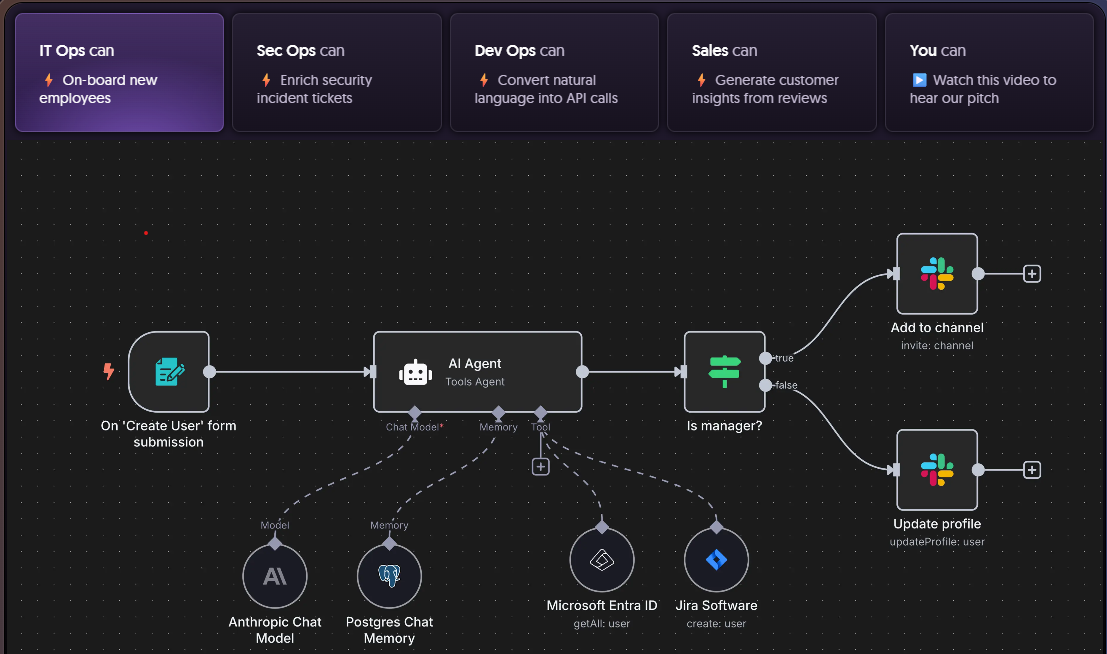
n8n’s visual workflow editor is a game-changer for automation. The drag-and-drop interface eliminates the need for extensive coding knowledge, making it easy for anyone, regardless of technical background, to create complex workflows. The visual approach to the creation process massively simplifies the design, understanding, and troubleshooting of automation on the platform.
Complex workflow creation (conditional logic)
Although the workflow creation process appears simple, it has immense potential for creating complex automation tasks for any situation. The vast array of different nodes supports various actions that make it possible to automate practically any task you can think of. Plus, you can schedule the tasks to be performed automatically using various schedules (cron), webhooks, and app events.
Code support
n8n is integrated with over 500+ apps, ensuring seamless connectivity between a wide range of applications and services. You can use n8n to automate workflows that span multiple platforms, streamlining data flow and eliminating manual data transfer. Naturally, you can also create custom nodes using JavaScript if you have the technical knowledge.
AI and agentic workflows
n8n supports AI integrations, meaning you can enhance any workflow you want with artificial intelligence. Self-hosted users can use a local model, while cloud users reference one of the many popular services like ChatGPT and Claude to enhance their workflow.
Community support
n8n has an active community. This is an incredibly valuable resource for users. With forums, Discord, and Telegram channels, you can easily find answers to questions, share knowledge, and work with other n8n users. This community support makes it easier to troubleshoot problems, get fresh ideas, and make the most of n8n.

How to use n8n
Here’s a brief step-by-step guide explaining how to use n8n and create custom workflows:
Getting started
First, you must choose your n8n deployment method, after which you can connect your first app to the platform.
1. Choose your deployment method:
- Self-hosting. This method is only suitable for users with advanced technical knowledge who have experience hosting servers. You’ll have to set up the server, scale it based on your needs, take care of its security, and configure its software. Mistakes can be costly and result in data loss, downtime, and security issues. With that said, here’s how to get started self-hosting n8n:
- Download and install Docker or Node.js
- Follow the official n8n documentation for self-hosting instructions (refer to their website)
- Cloud-based. This method includes n8n’s fully managed hosting service that handles setup, maintenance, uptime monitoring, OAuth, and one-click upgrades. Here’s how to get started using n8n on the cloud:
- Visit the n8n Cloud website (n8n.io) and create an account
- Choose a subscription plan or start with the 14-day free trial. Then, follow the on-screen instructions to create your instance
Once deployment is complete, you can start thinking about what kind of apps you’d like to connect. It’s not necessary to do that right away since you also have to prepare the credentials and API keys for your nodes.
Creating workflows
It’s easy to create workflows on n8n. Just follow these simple steps:
- Start a new workflow. In the n8n dashboard, create a workflow (Start from Scratch or Create Workflow from the Overview page)

2. Add scenarios. Drag and drop scenarios from the n8n library onto the workflow canvas. A typical workflow often begins with a trigger node (for example, Schedule Trigger, Webhook Trigger, or any event‐based trigger). From there, you can branch into action or data transformation nodes (for instance, If, Switch, Set, API, or connector nodes) to process and route your data.
3. Connect steps. Drag connections from the Schedule Trigger to the following nodes you add (for example, data-processing or API nodes). Configure each node’s inputs/outputs and parameters as needed.

4. Test your workflow. Run the automation by clicking the Execute workflow button (manual run), or activate the workflow to let the schedule fire automatically. Use the Executions tab to observe runs and troubleshoot.
Sample workflows with n8n
To demonstrate how n8n works, I’ve compiled a couple of example workflows that accomplish different goals. They show a few fundamental features that n8n offers, but they’re definitely not the only things you can do with it. The first workflow shows how to send a Slack message when a new file is uploaded to Google Drive. Meanwhile, the second one summarizes the emails you receive.
Here’s the first sample workflow:
- Trigger. Google Drive: On changes involving a specific folder
- Action. Slack: Send a message
- Configure. Connect Google Drive and Slack credentials for the workflow to work (API keys, Drive folders, Slack channels/users)
- Execute. Execute the workflow for it to complete its task

2nd workflow example
Here’s another workflow example that utilizes a preexisting template offered by n8n.
For this example, I used a template called Email Summary Agent, and, as the name suggests, it summarizes the emails you receive. You can choose from a wide range of templates and then edit them as needed to suit your needs.

Once you’ve found a suitable template, you must import the template to your cloud workspace or copy it to your clipboard in JSON format.

The next step involves setting up your template with the necessary account details, which is done using API keys. I was happy that the template told me which API keys are necessary from the very start. You can adjust these keys later, but remember that the workflow won’t work if the accounts aren’t set up.

As you can imagine, I had to connect my Gmail and OpenAI accounts for the Email Summary Agent to work. Once set up, I can finally see and edit the nodes however I want. I slightly edited the script in the Fetch emails action to better suit my preferences.

Finally, all that was left was to execute the workflow and evaluate its output in my inbox.

n8n pricing and plans
n8n has a few pricing options that make it suitable for organizations of various sizes. Here’s a table comparing the service’s available subscription options:
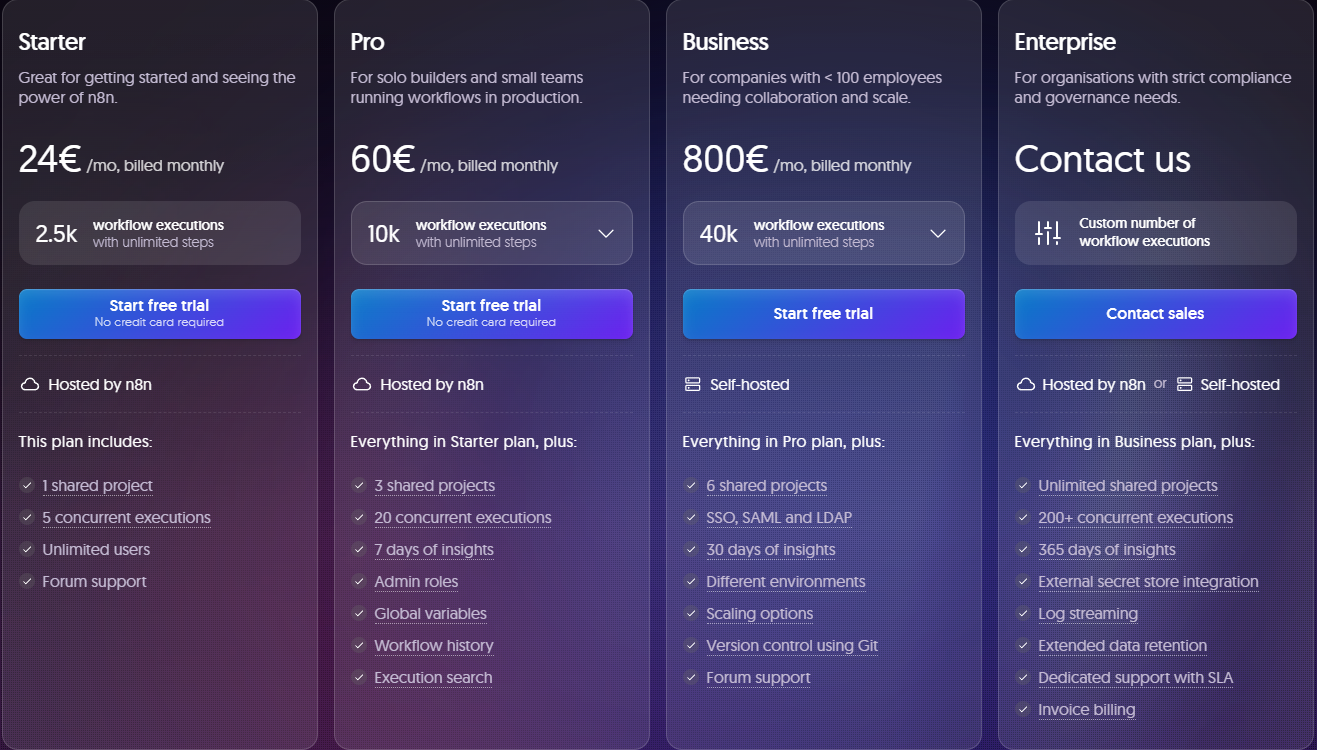
If you choose the Starter plan, you can get n8n for just $20 per month (paid annually). This is great for individuals who want to streamline their work with workflows and automation. You won’t get all its features, but you’ll have enough access to set up workflows that can help you save time and make your life easier.
The Pro plan works great if you’re running an SME and need additional access to n8n and a few extra perks. At just $50 per month (paid annually), your business will get a welcome addition to its tech stack. With over 500 apps to integrate, n8n will fit right in with your current business systems.
The Enterprise plan gives larger businesses full access to n8n and everything the powerful platform offers. However, the cost of this plan is not indicated, as pricing is customized based on each business’s needs. You can contact n8n’s sales team to get an accurate quote on the Enterprise plan.